Scrabble Helper
By Ford Software
Version 2021.07.13
(If you have visited this page before, be sure to Press
F5 to get your browser to reload the latest file/images.)
Contents:
Click for DISCLAIMER.
Scrabble is a trademark of Mattel in most of the world, except in the United States and Canada, where it is a trademark of Hasbro. It is used in the name of this program only for purpose of identifying the game for which it was written. Ford Software does not profit from this program in any way.
Scrabble Helper has no affiliation with Hasbro or Mattel or any other companies.
SH is not a Scrabble-playing program, it is only an aid in playing the game and requires the Scrabble program for SH to be of any use.
Scrabble Helper is free and can be distributed in whole or in part without restriction. The source code is provided with it. The code and program features or design can be modified or parts extracted for other purposes whether for profit or not, although licensing by Hasbro or Mattel may be required for commercial use.
The program could be rewritten in other programming languages as well as for other written languages.
Ford Software is just me, Nelson Ford. I can be reached at

I am 75 as of late 2021. If I cannot be reached at the above email address, then most likely time has taken its toll and there will be no further support for this program.
Close Disclaimer
Download
The program and source code can be downloaded from Source Forge.
Features
- Calculate and display scores for all words made.
- Display the letters which have not been played (the "Tile Pool").
- Keep track of time used by each player.
- Verify that a word used actually exists as spelled using a built-in words database.
- Look up a word in an online dictionary by clicking on it.
- View the category for each word, if any.
- Lets the user add new categories and change the category assigned to a word.
- Lets the user select which categories are allowed or not.
- Verify that a word is in a category allowed by the players.
- "Skip" is used when losing a turn to play due to a lost challenge, swapping tiles, or any other reason.
- Take back a play, which removes the tiles just played and adjusts back the score and tile pool displays.
This allows correction of typos, unallowed words, etc.
This also lets you try your letters in different positions to see which scores the highest.
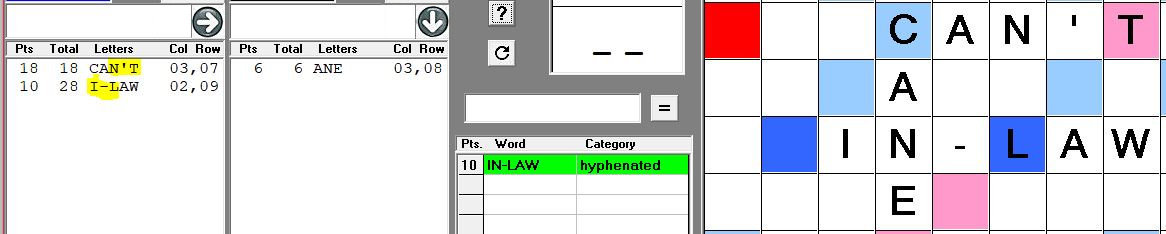
There are a lot of variations in Scrabble rules. Other than the opening play being on the center cell and that words cannot be made diagonally, SH tries not to enforce any particular rules because two players can set any rules they wish to play by. Use a blank for a hyphen to make a hyphenated word or an apostrophe for a contraction? That's up to you.
Setup
The ideal setup would be to have a notebook computer where one player can operate it and have an external monitor attached to it where the other player can see it, along with an external keyboard and mouse for the 2nd player.
An alternative is put a notebook off to the side of the Scrabble board far enough where both players can see the screen and have an external keyboard and mouse for one player to use to make entries.
Entering Letters
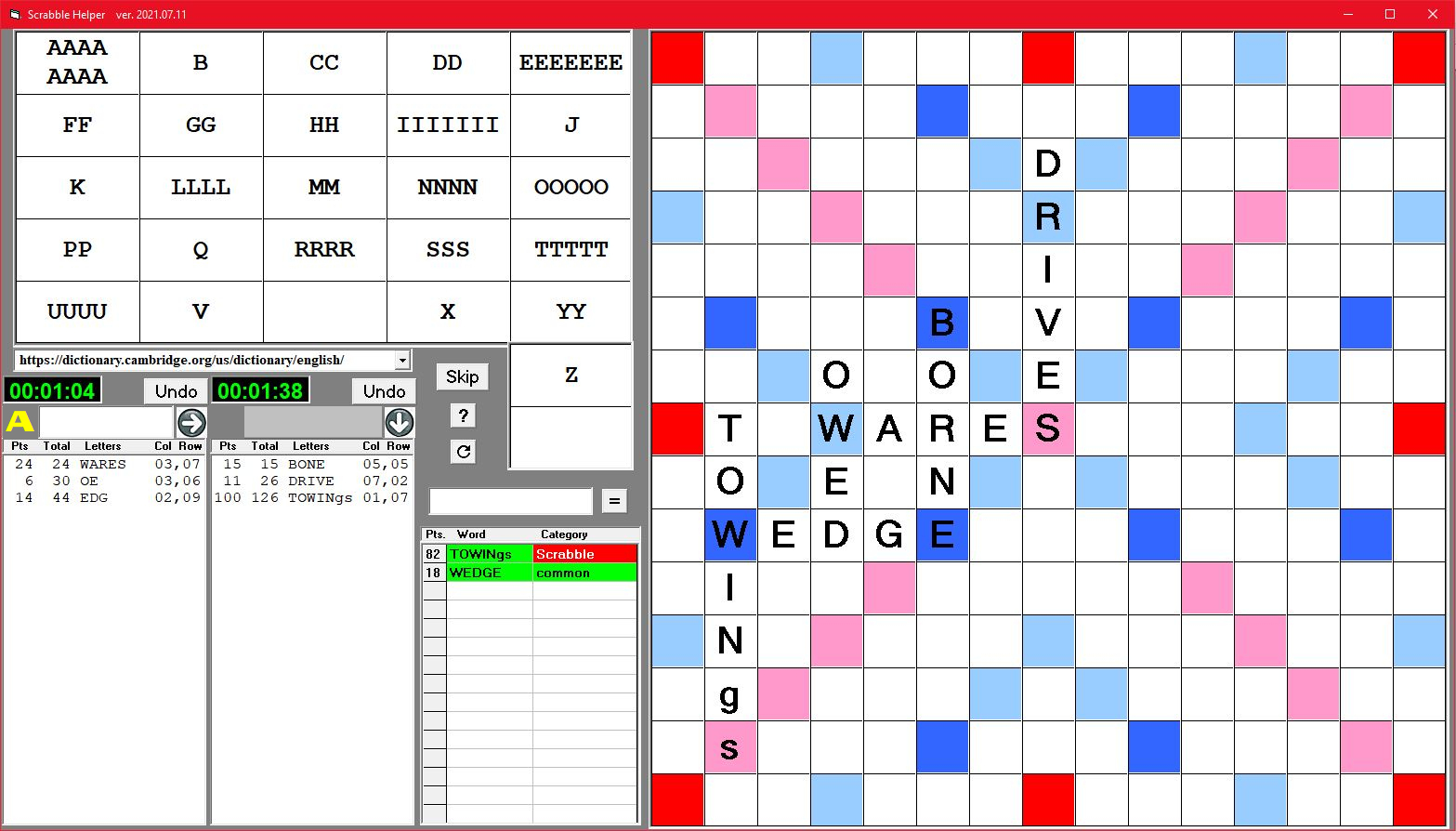
The first person to play enters the letters he is playing in the box below the left time display. The next player uses the box to the right.
Note: If you are making a word like EDGE by adding EDG to an E already on the board, don't type in the whole word (EDGE). You'll end up with EDGEE. I've made this mistake plenty of times, which is one reason the Undo feature exists.
If you hear beeping when entering letters, it is because the letters are lowercase.
Turn on your Caps Lock to enter letters in all uppercase, with one exception: when using a blank tile and assuming Caps Lock is on, hold down the Shift key and enter the letter the blank tile will represent to get it to appear in lowercase. If that doesn't work, turn off Caps Lock, enter the letter, and turn Caps Lock back on.
Showing the blank as a lowercase letter not only makes it easier to see later what the word is, but it is necessary for the automatic spellcheck to work.
In the screen shot above, the g and s in TOWINgs were both blanks.
Across or Down?
If a play is to go across the board, click the appropriate button..
To play the letters entered, click the starting cell for the word and SH will do the rest.
For example, if WORK is already on the board and REING are the letters entered and the cell two spaces before the W is clicked, RE will be put before WORK and ING will be placed after it, making the new word REWORKING.
If skipping multiple letters is not allowed, it is up to the players to enforce that rule.
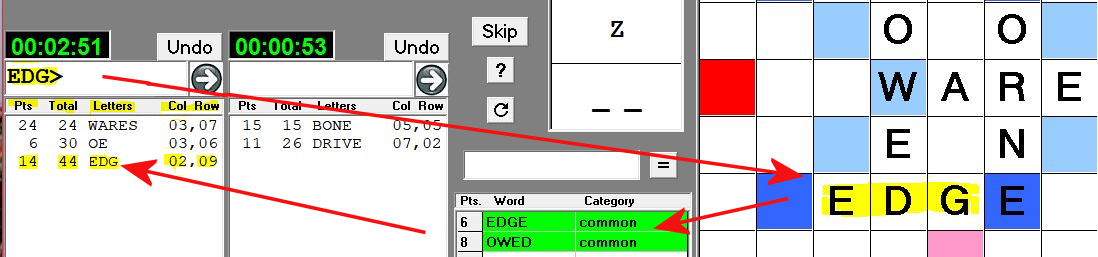
My two most common errors when entering letters are making a typo or forgetting to click the direction. Also, I sometimes click the wrong cell on which to start.
In such cases, click the Undo button and the tiles will be moved back to the input box, the scores adjusted back, and the line removed from the player's list box. Fix the mistake and go again. All of this just takes a second or two.
Several fixes have been made to make it easier to change directions of play and to avoid overlooking making a change in direction, ending in the big round arrows. Some people may think that entering letters directly on the board rather than in the text boxes, but without getting into a lot of boring details, a lot of thought was given to the question before settling on the input boxes. Email if you disagree.
A CapsLock indicator has been added. Having the input box beep when a lowercase letter is entered, but the indicator can help avoid the backspacing and retyping.
When a play is entered on the board, SH will add up the points for all words made by the play.
In the play list box are displayed the points for the play, the cumulative score, the letters played, and the column and row numbers of the starting play position where 0,0 is the upper left corner and the center square is 7,7. So 8,10 would be one column past the middle column, 3 rows down from the middle.
Verifying Words
A played word is verified via a word database which was adapted from a Natural Language Processing program, Artificial Intelligence - Cortex ("AI-C"), also written by Ford Software. The database has been modified for use by SH as described below and is named SH_Words.accdb.
At BoardGames.StackExchange, one person asked:
In playing Scrabble with friends, where can I find a dictionary that doesn't contain the ridiculous two-letter words that turn the game into a contest to see who has spent the most time reading the official Scrabble dictionary?
Scrabble Helper is such a dictionary/database.
Click here for background and a current list of Categories.
Background:
When the 2020 pandemic hit, my wife and I, being mostly home-bound, started playing Scrabble every afternoon. We agreed to just use "normal" words and even then we excluded interjections (like "hi"), slang/informal words, coloquial, and dialectical.
Our reasoning was that virtually any combination of letters or spelling of words would fall into one of those categories. In hindsight, we could have included words in those categories restricted to those in a major dictionary, but we have elected not to change our rules at this point.
We also don't use words which dictionaries define as being British, Australian, etc., which are not normally used in the U.S.
We generally used Webster's online dictionary to verify spelling and type of word, although it has many, MANY errors and drawbacks. For example, most verbs can have a gerund form (ending in -ING) which allow them to be used as nouns. And most nouns ending in -G can be pluralized by adding an -S. But more often than not, Webster's does not show pluralized gerunds.
Another problem with Webster's (and perhaps others) is that if a word is not found as entered, it often just shows the word in quotes so you know it's not a valid word.
But if a word form like NEXTS is entered, it shows the page for NEXT, which implies that it is a valid word, but doesn't specifically show NEXTS on that page as a noun plural..
So far, the Scrabble dictionary is the only one I've found which explicitly states that NEXTS is a valid word.
So sometimes we look up words at Dictionary.com and Wiktionary.org and go by the best 2 out of 3 or in some cases, we just agree that they are all wrong and play what we agree to.
I kept cursing Webster's and saying that I should be using AI-C's database and finally decided to make it happen.
The Words database has about 300,000 words in it. About 200,000 of those came from my AI-C program which is still under construction and so only a relatively small number of them have been assigned usage frequency from which the SH Categories were derived.
When you see that a word doesn't have a category, you may wish to add one, particularly if it is a word that belongs in a category which you have labeled Not Allowed.
Another 100,000 or so words are from Scrabble dictionaries which were used to fill in gaps in the AI-C dictionary. Almost all of these words would be unknown to 99.99% of the American population. Many of them are not even "words", instead being periodic table symbols, abbreviations, acronyms, proper nouns, etc. These words were left in the SH database, but given a category of just "Scrabble".
As a default, the Scrabble category is marked as Not Allowed for the benefit of average players (like me). If you see a word that you don't think belongs in that category, see the next section. If you want to use the Scrabble words, see below for how to Allow a category.
Scrabble Categories List
common
less common
uncommon
archaic
outdated
obscene
jargon
chemistry
culinary
horticulture
law
meterological
music tone
non-words
abbreviation
acronym
contraction
interjection
non-standard spellings
periodic table
prefix
suffix
proper noun
non-USA English (words which have not been Americanized)
British
Greek alphabet
Scottish
To print this list, click-and-drag to highlight it, then click File - Print and click on Selection.
Close list or click browser's Reload)
If a word is not in the SH database, it is displayed in red; otherwise, in green.
Making Changes
Undo Plays:
As mentioned elsewhere, you can click the Undo button to reverse the last play in a Score list. This will remove that play from the list and from the board and adjust the running score for that player. The letters played are returned to the input box for easy editing.
An undo normally should only be done before the next person has played and it must be replaced with another play by the same player; otherwise, it will confuse the program about whose turn it is to play. However, it is possible to next remove the other person's last play as well and redo all removed plays.
If you are undoing a play because of a challenge and the challenged player must forfeit his turn, then click Skip which will replace the removed play with a line saying "Skip".
If there is a penalty. click on the other person's last line and the Total score will be put in the entry box. Change the total to reflect the penalty and press Enter. This method of changing the Total score can be used for other purposes if needed, but only the Total score can be changed.
Add a Word:
If a word in not in the SH database, then in addition to the word being in red, the category field will say "Add word".
Double-clicking "Add word" will let you add the word to the SH database, but check a dictionary first to make sure that the word actually exists.
Double-clicking a word brings it up in an on-line dictionary. A drop-down list box above the letter entry boxes lets you select which dictionary to use. If you prefer one not in the list, go to its web site, search for a word, copy the resulting URL excluding the word, clear the existing name from the dictionary list box, paste in the new one, then try it out by double-clicking the word.

Normally, the word you are looking up must be the last text in the URL. One dictionary site added "-1" at the end of the word, but it worked when leaving off the "-1". The code could be altered to allow adding more after the word, but it doesn't seem necessary at this time.
Add or change a Category:
If s word was found but not a category or if it has a category but you want to change it, then double-click the category box. This brings up the list of categories as shown on the right side of the screen shot below.

To add a new category, type it into the box at the top of the categories list. To the left of it, enter "A" if the category is Allowed or N if it is not. Press Enter to add the category to the Categories database table and to the list, as well as to the word in the word-scores list.
To select a category from the list, click on it. Click on the scroll bar to page the list up or down. The category you click on will be entered to the box at the top of the list. Click the X button to delete it from the list or press Enter to assign it to the word in the words-score list.
You can enter any word as a category. The purpose is to assign to a category any words which likely will only be known by those who are involved with that category. These are the same kinds of words which have been assigned to "jargon", but assigning a specific category gives more control over whether or not to allow words in that category in your Scrabble game.
Some common words may have a category such as "acronym" assigned to them because one of the word's meanings in the AI-C database was given that classification while another meaning might have been given the "common" classification and when the word categories were imported, the first one found was "acronym".
Just change such incorrect categories to something else, like "common".
Change the Allowed field:
The first column in the categories list contains "A" for Allowed or "N" for Not Allowed. To change it, double click it.
If a word is classified as, say, "common" which is always allowed, but you don't want that word to be allowed, change it to a category which you do not allow. You can even create a category like "not allowed" for such purposes.
We use "Scrabble" as a catch-all for words we don't want allowed. Most of these words cannot be found in the dictionaries we consult. Because about 100,000 "words" were imported from Scrabble dictionaries, we haven't verified every one of them, so there may be some good words which were missed somehow when creating the AI-C dictionary. When we come across one of those during a game, we change the category.
Delete a Category:
If you have assigned words to a category and decide you don't wnat that category, the first choice should be to just rename it.
If you have words assigned to a category and want to assign them to another category that already has other words assigned to it that you want left like they are, then you can get SH to reassign the words which are connected to the category to be deleted to another category and then SH will delete the specified category.
For example, say that you want to delete the "uncommon" category and move all the words assigned to it to the "common" category. Here's how:
- Double click in the words-score list to bring up the category list.
- Click on the "uncommon" category and it will be copied to the text box at the top of the list.
- Click on the "X" button to delete it.
- SH will prompt you to make sure you want to delete "uncommon".
- After confiming it, click on "common" in the list.
- SH will look for all entries in the Words table which are assigned to "uncommon".
- SH will change "uncommon" to "common" for each such entry.
- SH will delete "uncommon" from the Categories table and from the list.
The Tile Pool
The tile pool displays the unplayed tiles, including those in the racks of the two players. That is, at the end of the game with no tiles left in the bag, the tile pool will show the tiles in the racks of both players. Of course you can figure exactly which letters the other player has by ignoring yours in the tile pool.
Or prior to the end game, let's say you have a rack of 1-point tiles and can't play more than 2-3 of them and even then, only get a few points for them and still be stuck with a bunch of poor letters. In the first maybe 3/4ths of the game you would probably want to use a turn to swap most of those tiles. In the last quarter, if you see in the tile pool that there are virtually no 3-point or higher tiles left and/or there are mostly all letters you already have, swapping may not make sense.
Another example is if you need a particular letter for a big play but see that none of those letters and no blanks are left, then you will know not to give up a turn exchanging tiles trying to get it.
Changing the Tile Pool
After each play, the program counts all the letters on the board, subtracts them from the starting number of letters, and displays the result on the tile pool, so it should not be possible tor the tile pool to be wrong.
Nevertheless, you can change the number of any letter shown by clicking on it, but if the problem is something like you've lost or added a tile to the game, your change will go away after the next play unless you change the source code.
Time Keeping
When the game starts, the left time clock will be blue. Once a tile has been drawn to see who goes first, click that clock and it will start going. After a play is made by clicking on the board, the player's clock stops and the opponent's starts.
If a game is interrupted for any reason, click on the running timer to pause it.
The time display clicked will turn blue.
Click again to start it going again.
When a timer is paused, the time for that timer can be edited. When the timer is restarted, it will start with the time entered.
Unscrambler
Put any number of letters in the box shown here, click "=", and a list of words made from those letters will be displayed along with their categories, if any have been assigned.
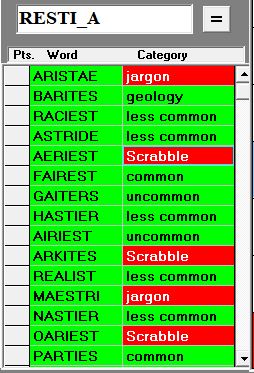
Only one blank can be used. Having two blanks in seven tiles adds a lot of complications and code for what is not really a significant feature of this program, but 2-blank support may be added in the future if enough people set up camp in my front yard with signs saying "Give Us 2 Blanks!!!"
Obviously, this is not meant for use by a person to come up with a word to play at his turn (except as suggested under Handicapping, below), but in the casual game my wife and I play, if she thinks she could have a bingo and is taking a long time looking for it, I may turn the monitor where she can't see it and put her letters in.
If no allowable words turn up, I'll tell her and we can move on. Of course if I don't tell her that no good words are possible, then she knows there is a possible bingo and will keep looking, but she would have anyway.
Some times if one of us has given up and made another word, we'll do the unscramble just to satisfy our curiosity. It may be a good way to learn, as well.
As usual, when a category for a word is blank, double-click on the category box to enter it or to enter "x" to change the Allowed option for the category throughout the database.
On a side note, when I wanted a screen shot of the unscrambler for this doc file, I just entered some random letters and was amazed to get over 20 words from them. I had only allowed for 15, which I thought would be far more than needed, but had to modify the program to get them all to fit.
Challenges
Different rules exist for how to play challenges when one thinks that a word is not a valid one. In this game, you are immediately alerted if a word is not in the SH database, which makes challenges moot. See the note above about protest signs in my front yard.
But the question remains of what the penalty should be for playing an invalid word or for making an unsuccessful challenge. You can visit the link above to read about various options.
For a casual game, we don't use penalties. If SH says that a word is not valid, we just undo it and try it again. But there should be a limit on how many times you do this. Otherwise, you may as well just put your letters into the Unscramble box and let it tell you. Of course, this ruins the point of the game, but at least it's faster than just manually trying one wrong word after another.
See Handicapping, below, for ideas related to challenges.
See Making Changes, above, for entering penalties.
Handicapping
There is a lot of luck in Scrabble. When my wife and I play, sometimes I'll beat her by 100 points and other times she'll do the same to me. Sometimes we'll have a run of 1-point games.
The point is that you can't always tell by a few games if one player is really better than the other, but over, say, 20+ games if one player wins 75% of the time, you might want to use a handcap to even the odds.
Any of the following should be ajdusted until the wins and losses balance out better.
Giving more tries:
One method is to let the better player only have one invalid word (or even none) on a turn and then they lose their turn, while the other player gets 2, 3, or more free invalid turns.
Time handicapping:
If the players have not already set time limits on a game, it's easy to see in a few games about how much time each player takes on average.
For example, if a weaker player takes an an hour and 20 minutes for a game while the better player takes 40 minutes, and still wins, you could try cutting back the time allowed the stronger player. There's probably no reason to give the weaker player more time because they are probably taking all the time they need.
If cutting the stronger player back to 30 minutes doesn't balance things out, keep cutting.
The problem is that the better player will be studying the board the same time the weaker player is. A solution to that is to keep him from seeing the board when it is not his turn.
Require common words:
If one player has a much larger vocabulary than the other, such as a parent and a young child, limit the Allowed words to those in the one or two most common word categories. The problem with this is that it limits the number of words available, making it harder to make plays.
I have been importing word lists aimed at specific grade levels. The words themselves are already in the SH database, but I'm changing their categories from somethimg like "common" to "6th grade" or whatever.
These lists are intended to teach kids words that they will be expect to know in the next grade or two, not words which they are expected to already know. As a result, most words which children will know even before starting school will still be classified in SH as "common" or even "less common" in some case.
Actually, it amazed me how many uncommon and even "jargon" words were in the word lists for 9th - 12th grades.
Parents could download lists for grade levels to give their kids to refer to when playing school as a way of making sure they are exposed to the words and learning to spell them.
When my wife and I play, we essentially allow only the Common, Less Common, and Rarely Seen categories, although a number of exceptions have crept into our games.
Another alternative is to allow the weaker player to use the unscrambler on, say, every 3 turns. You could say that he gets one unscramble for whatever letters he wants to enter from his rack. While using 7 letters may come up with a Bingo, there may not be a place to play the Bingo, or maybe there is no Bingo possible, so it doesn't help him whereas an unscramble for 5 letters may give him more options to choose from.
Give different numbers of letters to use:
Give the weaker player 8 (or more) letters and the stronger player only 6. The point is not that the weaker player is likely to make longer words than he already is, but that he will have more letters to choose from in making words of the length he usually makes.
Not only does this give the weaker player more choices, but it makes it easier for him to form a 7-letter Bingo while making it impossible for the stronger player.
Change the bonuses:
The weaker player could get 3x and 4x for 2x and 3x bonuses, or make any such changes you like. Unlike the previous handicap where players got different numbers of tiles, give each the same number, but the weaker player could get, say, a 20-point bonus for a 6-letter word in addition to the 50 for 7 letters and/or only give 25 points (or less) for Bingos by the stronger player.
The ability to assign different bonus values is not built into SH, as such, but you can click on the score in the player's score list and adjust the total accordingly.
Allow use of a list of difficult words:
Letters like J, Q, and Z are used in relatively few of the most common words, making it very difficult at times to come up wtih words using them. My wife and I use a list of some uncommon words for those letters, not limited to just words starting with such letters. For example, RAJ and HAJI are in our J list.
Practicing
If you are not already familiar with the words in the Scrabble dictionaries, you can go to www.Cross-Tables.com and work through some of the game records there using this program.
In addition to the information provided by Scrabble Helper, game records often contain comments by players about why they played what they did and even if they missed a better play.
Programmer Notes
SH uses MSFlxGrd.OCX to display the board, the tile pool, the word scores list, and the categories list.
The Words database (SH_Words.accdb) was created with MS Access 2007.
The Words database has two tables, Words and Categories. A word in the Words table links to a category via the category's ID# in the Categories database, but not every word has been assigned a category yet.
|